Friday, August 17, 2012

A Great Channel Path With Focusrite isa430MKII

Focusrite isa430MKII


The Focusrite isa430 MKII could be a useful addition to a sound engineer’s arsenal. It is a 2U processor designed to handle one audio channel. It features a line, mic, a comprehensive equalizer stage. The equipment also has an expander or gate section, a compressor, a soft peak limiter, preamps and a de-esser. The equalizer, compressor and input stage have been enhanced using circuit improvements and features of other Focusrite designs.

The ISA430MKII is originally designed for a complete channel strip but it can also function as a separate processor quite well. There is an additional insert point that enhances accessibility  where there used to be just one. With the main input/output ports and the two insert points, the processor now offers great access to the equalizer module, the mic preamp and the dynamics section.

This product has taken the strong features of the its original unit and added  tweaks and upgrades to make it a one of the best equipment for a sound producer. It is competitively priced that will sit well with an sound engineer’s budget. The product aims to offer a complete and great sounding channel path. This processor will definitely catch the eye of sound engineers and free lance producers. It can also sell well to people maintaining home and project.

Studios needing a really strong front-end equipment. The manufacturers offer an optional A-D card to add to an already versatile processor. Experts predict that the ISA430 MkII will lead the industry for the more upscale analog recording channels market.

Share

Professional Sound Monitoring With Dynaudio BM5

Dynaudio BM5

The compact nearfield monitor products market is swamped with new entrants and established makers coming up with newer versions of their product. An established manufacturer such as Dynaudio has kept up with market trends with its very own Dynaudio BM5 nearfield monitors. This two-way system is reflex-loaded and comes with a 170mm bass to mid-range driver plus a 26mm tweeter. The speakers can carry two 50-watt amplifiers with drivers that has been designed for low-compression and high power demands of professional sound monitoring.The driver featrure an external voice-coil design that can significantly reduce thermal compression. The tweeter is designed for low compression and high power handling, operating over a wider bandwidth.

The  monitor of the BM5 apprears to the desiged for professional applications. There is only one XLR input socket and a lack of a viable gain crontrol may lead to an unbalanced right and left channel. In keeping with the seemingly professional theme, the product has selectable equalization presets that can be controlled with small switches at the back. There is also a high-pass filter that will ease the monitor’s integration with subwoofers. The user can tailor the speaker’s bass level to its surroundings or to personal preferences by switching in a low-frequency shelf. There is a mid-range notch filter that can yield approximate compensation if the monitors are in large surfaces. The high –frequency shelf  can be warmed if bright or brightened if dull.

The BM5A’s design is clean and simple with an aluminum chassis, a semi-gloss front panel and deep cabinet proportions. The front panel edge is thick possibly to control acoustic edge diffraction. 

Share

Digidesign Mbox

Digidesign Mbox

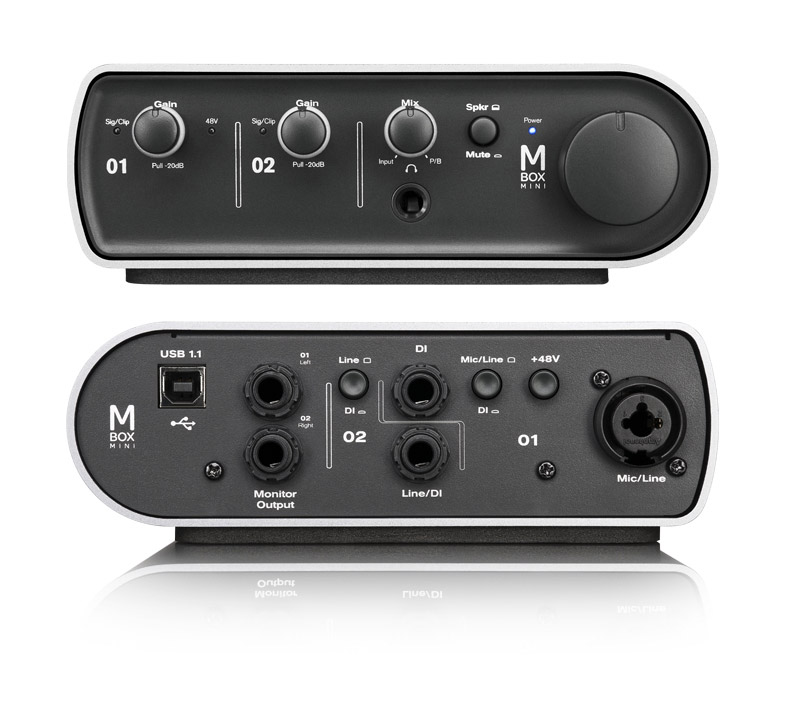
Digidesign claims their Mbox audio interface is selling like pancakes and that their product is selling faster than they can manufacture them. The Digidesign mbox audio interface is competitively priced and it has opened up the industry stndard to untapped markets. The device makes use of USB technology as another audio protocol. At the front panel, you will see the Mix Control knob to control the level of source signal you want to hear. The back panel holds the MIDI in and out ports, the XLR inputs and pairs of direct and line inputs.

This half-rack input/output device is pleasing to the eyes, lightweight and has a carrying handle attached to it. The knobs on the front panel feel sturdy. Connecting the device is a breeze and its power supply is through USB. The device handles all the audio conversions so there would not be any need for a new soundcards. 

The package comes with outputs for headphones and a pair of monitors. The Mbox contains has all the connectivity a music engineer needs and they can even transfer a mix to an old DAT player and extract audio from the DAT. The device has one MIDI in and one MIDI out port so that users can hook up their controller keyboard plus a 16-channel MIDI device. While the trend is veering away from hardware samplers and synths into their software versions, this may not be a significant issue with most users as they can expand their hardware capability through mounting a third-party MIDI patchbay into the set up.

Share

Marvelous Mixing with Behringer x32


Since the emergence of digital audio engineering, practitioners in the field has had a rocky relationship with their sound mixing consoles. The Behringer x32 will put an end to this and ensure that the relationship between a sound engineer and his console is smooth sailing. This digital audio mixing console will take away the complicated navigation of buttons and knobs leaving the engineer to focus on his session or event. The console has 25 mix buses and 40 processing channels all with signal processing and can be configured in not time at all.

Sound engineer will never lose control of the sound with the console’s programmable preamps. It has a dedicated channel setion has 17 buttons and 13 rotary controls that are easily accessible for the easy adjustment of the channels’ compressor, the four-band parametric equalizer and all other controls. Each channel strip has its own LCD providing significant channel information in one quick look.

The x32’s virtual FX Rack gives users access to multi-effects processors including dynamics, delay and chorus while rinning 4 reverbs at the same time without the need for an external hardware. The extensive connectivity of the x32 features 32 programmable mic preamps, 6 line ins and line outs, 16 XLR outs. A cable from front of house to the stage can transfer 48 channels of audio in just one line. 

The sound mixing console has an 800x480 high-contrast color TFT display that can show its eight control screens in a click or two. When you have picked your desired function, the rotary or push encoders will let you set source and parameter assignments without going throug a series of menus or consulting your manual. 

Share


The Avid Mbox: a Stylish Interface

Sound engineers will appreciate the sleek and elegant look of the Avid mbox audio interface that is USB powered so there is no more need for an external power supply. Its drivers are quite solid making for a smooth installation. It interacts seamlessly with Avid’s Pro-Tools 10 digital audio workstation.

With the Mbox, sound engineers can do separate mixes generated for the six output pairs and mix the effects in with any of the pair while the per channel effect are global. Effect returns for stereo 1, 2 and 3 are independent but they are groupd for S/PDIF and headphone outputs. The single global effects consist of reverbs and delays. The set up of the Mbox allow for either three sets of stereo speakers or a 5.1 channel operation.

There are four mic pre-channels in the Mbox each with an optional limiter, 20db pads and a direct option that bypasses the mic-pre circuits. Jacks for channels 1 and 2 are at the front and the jacks for 3 and 4 are on the rear. The limiters are ideal fr situations where take two is not possible like in live performances. You get a single global phantom button for turning the device on and off, and a button to let you switch from three stereo outputs to another that allows you to listen in mono. The two headphones that come with the package each has its independent volume control.

The product is encased in an aluminum case and its controls have a good feel. As for the sound, the sample rate conversion is smooth and the device is up to the task of producing radio programming and mixing down remotely tracked performances. 

Share

The Apple Audio Odyssey

Apple iPod Shuffle

We can safely say that a considerable chunk of the human population owns some kind of Apple product. The company started making waves in the electronic gadgets industry via its music player device, the iPod. This is where everything started and now consumers have gone gaga waiting for the latest versions of their Mac computers, iPhone and iPad. While all these product lines are mounted with the iTunes music player, it is the iPod that remains to be dedicated to cater to your music playing enjoyment.

The iPod Touch is the flag bearer for this product line. A music player where you can also run your favorite applications. The latest iTouch has the iMessage function that allows users to send unlimited text messages to all other Apple hand-held devices over WiFi. The new version also has a high definition camera for pictures and videos. You can download over half a million games and apps into this device and share them with all your other Apple devices through iCloud.

The iPod Nano Muti-Touch music player is a more compact audio device that comes with an exercise app that lets you device a workout plan and set it to your favorite music. You can attach the Nano to a wrist band and wear it as a wrist watch with 18 clock face designs. There is an FM tuner for those who wish to listen to the radio.

The newest baby of the audio product line is the iPod Shuffle. It is sleek with it s polished aluminum finish and comes in five vibrant colors. With 15 hours of battery life, you can enjoy hundreds of tunes in its 2 gigabyte capacity. It comes with a clip that you can attach to any part of your clothing making it wearable so that you can take it with you anywhere.

Share

Apogee Symphony For Music Masters

Apogee Symphony

Apogee Symphony comes to the market at a time when your Digital Audio Workstation is performing at its peak with powerful and highly advanced multi-processors to create the ideal native recording environment. This audio interface is the answer to the input to output delays experienced during live recording. It is is compatible with all types of multi-processors and PCIe architecture and is optimized for a Mac-based DAWs.

The Symphony system uses its proprietary set of converters, expansion cards and PCIe card. Mounted to a powerful multi-processor and Symphony’s mobile card, you instantly have the nucleus of your sound studio. The Symphony tower offers a total of 96 channels plus you get an additional 32 from your laptop. You would need another drive for your DAW software and address the latency issues with a fast storage drive.

The system is run by the company’s Maestro sound mixing and management software. It comes in an attractive base unit with a rackmounting box. There are 16 bar graph meters laid out across the front panel at the center portion. You get a pair of headphone sockets that can be independently controlled plus a poewr button. The LED display shows the sample rate clearly and there are text labes that light up to indicate what can be seen on the meters and an OLED that indicates system status and its operational modes.

Overall, the design is adequately openended and capable of accommodating future standards for audio interfaces. It is this ability to work with future standards that makes this Apogee interface a good buy. Apogee’s web site has already released prospects for the Symphony’s progression. 

Share

Fine Tuning With Antares Autotune

antares autotune

Many companies have attempted to come up with different tuning products which have invariably succeeded or bombed. Antares, on the other hand, continues to tweak its existing Antares autotune product, which sound engineers appreciate. This tuning product earned some measure of popularity among celebrity disc jockeys like T-Pain who have relied on this tuner in creating their signature sounds.

The latest version of Antares’ tuning product is a study in functionality. The standard features like the Natural Vibrato and Humanize controls are still present. A remarkable improvement is the note-based graphical editing capability that eliminated the issues with pitch editing found in previous versions. The tuner has a wider range of signal sources and users will have no problems relating to octave tracking that can produce unappealing side effects. With vocals still being the main focus, the other monophonic instruments have been tweaked and improved.

The tuner’s pitch tracking is ideal for both auto and graphical mode. It has a feature called Pitch graph which can plot a graph of time. The graphical mode has similar controls as the auto mode including, key and cale, transpose settings and throat modelling. The tuner can process the content and present it to the user as note objects by pushing the make notes button. The Antares tuning device enables the user to make as many adjustments as they need with dedicated tools. For designing transitions among note objects or for some bolder adjustments, the user can utilize the correction lines and correction curves functions. After tweaking your music you will get three contours, which is the original pitch, the correction and the output pitch.

Share

Better Control With Akai MPK61

Akai MPK61

The Akai MPK61 is a MIDI-over-USB controller keyboard with 61 keys, a pad controller and sample sequencer, remote transport and a mixing surface ideal for DAWs or digital audio workstations. Its full-sized keys are semi-weighted and has an aftertouch and pressure-sensitivity that gives and intimate and tactile control over virtual intruments. The keyboard has various capabilities including mod wheels, a responsive pitch, sustain pedals and assignable inputs ideal for expression. The MIDI input and output jack gives sound engineers control over the modules and the hardware synthesizers. The keyboard is built with an advanced arpeggiator within the MPK that will benefit software and hardware instruments. This multi-phase arpeggiator’s tempo can sync up to any DAW project or any external MIDI gear.

The MPK61 supports Akai’s MIDI Machine Control protocol and has 76 rotary knobs, buttons and slider. It can gain hardware access to any control feature of a DAW. It’s dedicated transport section can transform the controller keyboard into the nucleus of any studio infrastructure. The controls resemble a mixer for better control over arming, panning and channel level. They can also control a host of functions and effects in plug-ins and in rack or virtual synthesizers. A huge and backlit screen displays the MIDI presets.

At the top of the MPK61 you have 16 MPC pads that are pressure and velocity sensitive. The MPC functions include, 16, level, full lever and note repeat modes. There is a tap tempo control for the arpeggio and note repeat functions. With tactile control, MPC pads and a keybed that is semi-weighted that gives a level of musicality to programming that cannot be found in traditional controllers. 

Share

Plug and Play Akai APC40

Akai apc40 USB MIDI controller

Massive hype ensued after the introduction of the Akai APC40 USB MIDI controller with considerable pre-order placements. The controller works well on live performance being a plug and play device. All you need to do is to launch the Live function and pick APC40 as your choice of controller and you are all set. The Akai APC40 controller enables bi-directional interface between the controller and the Live feature. All the tweaks done on the APC will appear in the application. This allows live sound engineers to switch to and from the hardware and the software at will.

With the APC40 you can customize all the buttons, knobs and sliders. Session overview is possible with this controller. You also get a clip launch button matrix and a mixer section. Other features include track selection and device control encoders, a transport, track and tempo control plus a crossfader.

The layout involves a matrix of rubber buttons for the session view that has eight volume faders and one master fader underneath it. The right side is flanked by plastic knobs and LED position rings. The hard buttons are in between the faders and the knobs are for tap tempo, bank selection, nudge and shift. Beneath it are the Live commands. The system is encased in a metal chassis with rubber on the side panels. The rubber buttons are good to the feel and the faders are smooth. Some users were less enthusiastic about the knobs that are made of plastic as well as the proximity of the faders to each other. 

Share

High Time for Ableton Live


Ableton live

Ableton live is a recording studio software product created for live performances. Most recording studio software products were developed for stationary use only in static settings but with this particular software program, Ableton has definitely pushed the envelope. The program has successfully merged tools for recording and editing with sequencers, real-time effects and loop machines giving sound mixers in the electronic genre a compelling instrument in live parties as it offers all other music engineers a great tool to refine, modify and edit music in their studios.

Ableton has gained popularity among music engineers with its involvement in online user-guides and in tutorials, sharing its expertise and experience to the sound mixing industry. The company actively develops FAQs, tutorials and other educational resources to enrich the knowledge of sound engineers. The goal is to simplify recording studio software, which can sometimes be overwhelming for new users.

This particular recording studio software is equipped with a new drum rack that streamlines the beat production. Users have the ability to use multiple time signatures while working within a single Live Set. Automation has been made easier to enable sound mixers and engineers to go about their work more quickly. A video export function is added for easier movement of music files through various interfaces. There is a tempo nudge that enables sound engineers to sync up with other musicians or disc jockeys in a live performance. But the feature that users appreciate the most is Ableton’s popular and intuitive interface that is still quite user-friendly when used with a complicated rack.